



How To Create A Classified Ad

To create a classified ad, please follow the steps below. These apply to people using the site via a computer.
Method 1:
Step 1: Click on Log in (located at the top right corner of the home page).

Step 2: Log in to your SCI Video Blog account. If you don't have an account, please Register here.
Step 3: Once logged in, go to your Control Panel (dropdown located at the top right corner of the home page).
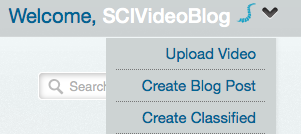
Step 4: Click on Create Classified (located at the top right side of the page).
Method 2:
Step 1: Click on Classifieds tab (located at the right of the home page).
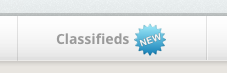
Step 2: Click on +Create New Post (located at the right of the page).

Step 3: Log in to your SCI Video Blog account. If you don't have an account, please Register here.
Tips:
Title: Please choose an appropriate title for your ad. It shouldn't be too long or too short and shouldn't contain special characters.
Keywords: These are the words users search for on Google, Bing, Yahoo. Picking the right set of words will increase your chances of having your ad appear in the early pages on a search engine. Try to keep the words to a maximum of 10 words. Separate by commas.
Category: Please choose the appropriate category. If you can't find one, please let us know and we'll add it.
Contents: Be as specific as possible. Including pictures will attract more users. Please don't include any personal information other than your email, and encourage people to comment to avoid explaining to each user separately.
Pictures: You can upload your pictures by clicking the image icon. Your pictures need to be a maximum of 600 px by 600 px in width and height, and 1 MB in size. Read more about Acceptable File Formats and File Sizes.

Once submitted, an admin will approve your classified and you'll be notified when it's live. Feel free to contact us if any problem occurs.